The much-anticipated MacBook Pro PROLED XDR Display arrived today with touch support, "a whole new way to interact with your work" according to Apple. Steve, Craig, and Phil were somewhat less enthusiastic:
‘Ergonomically Terrible’ — Steve Jobs Said Touchscreen MacBook Wouldn’t Work, but Apple Is Finally Doing It Anyway
"We've done tons of user testing on this, and it turns out it doesn't work," Jobs said at the company's "Back to the Mac" event in 2010. "Touch surfaces don't want to be vertical. It gives great demo but after a short period of time, you start to fatigue and after an extended period of time, your arm wants to fall off," Jobs continued. "It doesn't work, it's ergonomically terrible."
iOS app porting won't make Mac feel like iPhone, Apple's Federighi says
After a very clear "no" delivered during the keynote, Federighi once again denied any plans to merge iOS and macOS, or develop a touchscreen-equipped Mac.
"We really feel that the ergonomics of using a Mac are that your hands are rested on a surface, and that lifting your arm up to poke a screen is a pretty fatiguing thing to do," he said. "I don't think we've looked at any of the other guys to date and said, how fast can we get there?"
The Inside Story of Apple’s New iMacs
There’s one thing, however, that is conspicuously not in the new iMacs — a touch screen. While Microsoft and others now believe that multi-touch should extend to the desktop display, Apple believes this is dead wrong. “From the ergonomic standpoint we have studied this pretty extensively and we believe that on a desktop scenario where you have a fixed keyboard, having to reach up to do touch interfaces is uncomfortable,” says Schiller. “iOS from its start has been designed as a multi-touch experience — you don’t have the things you have in a mouse-driven interface, like a cursor to move around, or teeny little ‘close’ boxes that you can’t hit with your finger. The Mac OS has been designed from day one for an indirect pointing mechanism. These two worlds are different on purpose, and that’s a good thing — we can optimize around the best experience for each and not try to mesh them together into a least-common-denominator experience.”
Apple Goes Part Time on Touch
[M]aking the Macintosh screen—even just on the laptop—touch-centric is a crime against nature, as it violates the functionality intrinsic to the form of a notebook or desktop computer, at least as Apple sees it. Indeed, last week, Schiller was even more emphatic when that subject came up.
“We think of the whole platform,” he says. “If we were to do Multi-Touch on the screen of the notebook, that wouldn’t be enough — then the desktop wouldn’t work that way.” And touch on the desktop, he says, would be a disaster. “Can you imagine a 27-inch iMac where you have to reach over the air to try to touch and do things? That becomes absurd.” He also explains that such a move would mean totally redesigning the menu bar for fingers, in a way that would ruin the experience for those using pointer devices like the touch or mouse. “You can’t optimize for both,” he says. “It’s the lowest common denominator thinking.”
Apple came to this conclusion by testing if touch screens made sense on the Mac. “Our instincts were that it didn't, but, what the heck, we could be wrong—so our teams worked on that for a number of times over the years,” says Schiller. “We’ve absolutely come away with the belief that it isn't the right thing to do. Our instincts were correct.”
[Emphases added.]
❧ 2026-10-28
Datalab's open-source Marker and Chandra convert images and PDFs into Markdown, HTML, JSON, and other structured formats with astonishing accuracy, even on degraded text.
Their hosted service runs an improved version of Chandra that promises higher accuracy than the open weights. It includes $20 in free monthly credits, zero data retention by default, SOC 2 Type 2 compliance, and custom BAAs. Opting into data retention earns a 25% discount (sensitive files are best kept off cloud services in any case). Pricing per 1,000 pages: $4 for Fast or Balanced mode; $10 for Accurate.
Tested with 1,525 pages of poorly typed and copied material through Balanced mode, with astounding results. A few sample pages: Original PDF | Markdown. The whole job took just a few minutes and used only $4.57 of the $20 in free monthly credits. Kick the tires in the Playground.
❧ 2026-10-16
🤖 tinydefrag 1.0.0 [155k] {S} Dependency-free C utility for macOS and Linux that defragments individual files or entire FAT12/16/32 and exFAT volumes. Inspired by Eric Helgeson's account of Claude helping get fatdefrag over the finish line; independently implemented via Claude Opus 5.5 (Ultracode effort). 📺
❧ 2026-10-08
RemoveMacAI:
"defaults write -g ComputerUseAllowForbiddenTargets -bool YES unlocks full YOLO mode for ChatGPT/Codex app in macOS"
- "Another useful one:
BROWSER_USE_SECURITY_MODE=disabled-for-local-testing The codex built in browser has a load of features but its permissions gated, even with yolo mode. OpenAI seems to want to pretend you use the built in browser as your main normal browser. So enforces required permissions checks. But if you just use it for development these are just annoying and get in your way. This setting disabled it."
- "Browser Use calls
https://chatgpt.com/backend-api/aura/site_status and fails closed with 'not permitted' on hosts like Naver Blog. The bundled plugin already has a local-testing flag that skips that check: BROWSER_USE_SECURITY_MODE=disabled-for-local-testing. I wrapped that into a small third-party helper (macOS): wrap node_repl, optional origin allowlists, re-apply after ChatGPT updates. Repo: https://github.com/leixyou/bypass-codex-site-safety"
Live subtitles with translation for macOS:
- v2s: "Live bilingual subtitles for any app on macOS. Captures audio, transcribes speech, and translates offline — all from your menu bar." | GH repo
- Subtitles: "Live captions for anything your Mac plays. Calls, videos, podcasts, and lectures, transcribed as they play and drawn in an overlay that stays above every window. Translated live if you want it. Nothing leaves the Mac." Licensing: "The download is a free seven-day trial, and a license key from Gumroad keeps it going. Everything needed to build your own copy is in this repository, and build.sh below does exactly that." GH repo
Talon: "Write, code, and control your computer with Talon. Voice, eye tracking, noise recognition, and Python scripting for macOS, Windows, and Linux."
Remove or disable Windows Defender:
Logo Design Skill for Claude & AI Agents
Offlined v2.0.0: offline Wikipedia from Kiwix ZIMs + a local AI tutor + maps.: "Free for personal use (not open source), Windows 10/11."
TypingMind: "The best frontend for LLMs. Advanced chat UI for AI models. ChatGPT, Gemini, Claude, and more. All in one place." | HN (2023)
OpenMontage: "World's first open-source, agentic video production system. 12 production pipelines, 100+ tools, 700+ agent skill and production-knowledge files. Turn your AI coding assistant into a full video production studio."
Your LG ‘Smart TV’ is Spying on You - Here’s How to Stop It Permanently
REA (Reverse Engineer Anything): "See a feature in an app that you want in your own product? Ask your agent to investigate it with REA. It can inspect the app without its source code, explain how the feature works, show the evidence, and build a version for your project."
❧ 2026-10-07
Casting about for a software alternative to CRU's Mouse Jiggler MJ-3, stumbled upon WakeyWakey, move-mouse-macOS, and MoveMouse, but sought something simpler. Generated tinynudge with Opus 5.5 in one pass, then refined it with GPT-6 Astra, yielding 33 lines of Swift that compile to a 55k executable:
Checks input idle time every N seconds (default: 60). If idle for at least half that interval, moves the cursor 1px right and back. Requires Accessibility access ("Device Control and Data Access" in macOS 27+); prompts if your terminal lacks it.
Separately, holds a caffeinate -d-style power assertion, visible as tinynudge in pmset -g assertions; released on exit.
Tested in macOS 26 Tahoe and 27 Golden Gate.
❧ 2026-10-01
Splash is making waves in LLM inference on Apple silicon:
"It delivers 2× the decode speed of the next-fastest engine we measured on Qwen3.8-27B and stays ahead at every context length we tested, to 32K tokens. At four parallel subagents, the speedup increases to almost 4×."
The official release requires M3 or newer, but Erik Paperniuk has backported Splash for M1 and M2 Macs:
Steps
Install: curl -fsSL https://github.com/paperniuk/splash/releases/download/1.0.2-m1/install-m1.sh | sh
Serve: splash-m1 serve --model incoai/Qwen3.8-27B-Splash (First run downloads the 17.4GB model package and prepares it for the GPU; later starts are much faster.)
Chat at http://127.0.0.1:8000. To disable the chat page, add --no-webui to the command in step 2. More settings.
Set http://127.0.0.1:8000 as the OpenAI-compatible API base URL in apps like Goose. No key is needed unless you set one. Several coding agents are supported too, e.g., splash-m1 opencode.
Update
Shortly after posting, stumbled onto this tweet from @ashxhart earlier today:
M1-4 silicone, I got you🫡
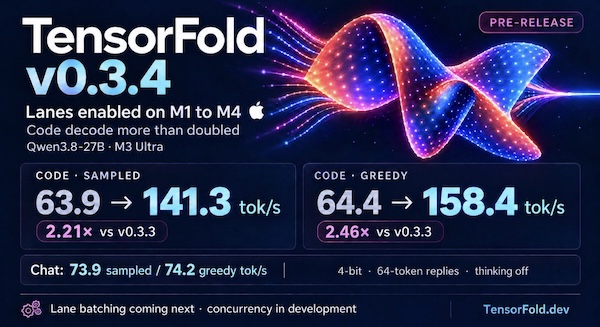
TensorFold v0.3.4 is up! Enabling lanes on M1–M4 more than doubled Qwen3.8-27B code decode on M3 Ultra to 141–158 tok/s.
Lane batching is coming next, with concurrency already showing early gains.
Follow the progress at tensorfold.dev.
Installed TensorFold 0.3.4 on a 2021 MacBook Pro (M1 Pro, 32 GB) via uv tool install git+https://github.com/ashhart/TensorFold.git and ran it with TF_ROW_MATMUL=row_qmv tensorfold serve Vontra/Qwen3.8-27B-MLX-4bit. The TF_ROW_MATMUL=row_qmv setting switches to an older fallback path, because the new v0.3.4 kernel for M1-M4 Macs crashes at load on M1 and M2 models.
Benchmarked both projects with a script crafted by Opus 5.5 in Claude Code:
Results
Splash-M1 ran Qwen3.8-27B chat about 1.3-1.5x faster than TensorFold, though that may change once the M1/M2 bug is fixed:
Splash-M1
incoai/Qwen3.8-27B-Splash at http://127.0.0.1:8000: chat, thinking off, 64 tokens, median of 5
  sampled   13.0 tok/s   (runs: 10.1, 13.0, 14.4, 11.2, 16.4)
  greedy    14.5 tok/s   (runs: 11.6, 14.4, 14.5, 14.5, 14.5)
TensorFold
Qwen3.8-27B-MLX-4bit at http://127.0.0.1:8080: chat, thinking off, 64 tokens, median of 5
  sampled    9.7 tok/s   (runs: 9.8, 9.5, 9.7, 9.4, 9.7)
  greedy     9.7 tok/s   (runs: 9.6, 9.7, 9.7, 9.7, 9.7)
❧ 2026-09-26
Related: GPT-6 Astra-generated short on "Time" | Elaboration (but no prompt, sadly)
❧ 2026-09-25
p2p.kiwi is a free and open source desktop conferencing and screen-sharing app from The Don't Be Evil Company for macOS, Windows, and Linux. It connects participants without requiring accounts, using STUN to help establish direct peer-to-peer connections and optional TURN relays when needed. Under the hood, it uses WebRTC for transport, MLS for group key management, and SFrame for end-to-end media encryption.
❧ 2026-09-24
Increasing a UTM virtual disk's size does not automatically expand the guest's APFS container. If a Recovery partition lies between the container's partition and the added free space, it blocks direct expansion.
This Codex/Astra-crafted script uses Python 3.9+ standard library and macOS diskutil, cp, and lsof; no pip packages, Go, Homebrew, or QEMU are required. It targets macOS 26+ with diskutil image support and an APFS host filesystem for copy-on-write backups:
Usage
Shut down the VM and do not start it while the script runs. Pass either the .utm bundle or its writable disk image. Inspection is the default:
python3 resize_utm.py '/path/macOS.utm' --size-gib 200
Apply the change, creating a new mandatory image backup first:
python3 resize_utm.py '/path/macOS.utm' --size-gib 200 --apply --backup '/path/macOS-before.img'
The size is GiB, so 200 means 214,748,364,800 bytes (Disk Utility displays about 214.7 GB). An initial 120 GiB image therefore gains 80 GiB. The main APFS container is smaller than the disk because ISC and outer Recovery retain their space.
What it does
- Resolves the single writable image from an Apple-backend UTM bundle, or accepts an image directly. Rejects physical devices, images currently open by another process, shrinking, and unexpected partition layouts.
- Attaches read-only for inspection. Validates both GPT headers and partition arrays, their CRCs, partition bounds/order, and Recovery's APFS superblock geometry.
- With
--apply, hashes the entire Recovery partition and creates a native APFS clone backup of the image.
- Uses
diskutil image resize --image-only to grow the image. On a tested macOS 27 build, this already relocates Recovery for ASIF images.
- If needed, relocates Recovery itself through the attached raw device. It derives usable space from actual device capacity and GPT array dimensions, preserves APFS block alignment, copies and SHA-256-verifies Recovery before updating GPT, and writes both GPT copies with new CRCs. Partition IDs, names, attributes, and unrelated entries are preserved.
- Checks Recovery against its original full SHA-256, detaches/reattaches to refresh the kernel's partition map, and expands the main APFS container using
diskutil apfs resizeContainer ... 0.
- Verifies the partition map and checks the final GPT layout fills the space up to Recovery. APFS's resize operation also performs a filesystem consistency check.
Only exactly three outer partitions, in physical order ISC / APFS / Apple_APFS_Recovery, are supported. Matching uses the Recovery type GUID, not a guessed name. Raw and ASIF image interpretation is delegated to macOS. The relocation core supports 512- and 4096-byte logical sectors. Growth smaller than or equal to Recovery's size is deliberately refused to avoid an overlapping copy. Already-grown images can be completed by requesting their existing capacity.
Failure and rollback
This is not a crash-atomic disk transaction. A crash during GPT commit can leave its copies inconsistent; validation then fails closed. The script does not infer missing Recovery data from an NXSB signature, and does not attempt to repair a partially executed third-party resizer. The retained image backup is the rollback source. A copy interruption before GPT commit leaves the original Recovery and GPT intact, although unused destination space may have changed.
If anything fails, leave the VM stopped. Eject any attachment listed in the log before restoring. Replace the modified image with a copy of the retained backup at the exact original image path. Do not restore only the old GPT after APFS growth.
An encrypted/locked APFS guest may require unlocking its Data volume before APFS expansion; the script reports the native error rather than asking for or recording passwords. Do not launch UTM or attach the image in another app during the run; the initial open-file check is not an exclusive lock against other applications.
References
The workflow is based on the UTM discussion and yunyang088's Go resizer. The discussion documents the stale-GPT-end bug, fixed here by computing geometry from actual device capacity. This implementation takes a different interruption strategy: verified nonoverlapping copy before GPT publication, with a mandatory whole-image backup for rollback.
Postscript
Briefly removed this post after an update to macOS 26.7 within the resized VM left it temporarily unbootable. However, further testing with an unresized copy, along with the reports below, indicates that the boot issue is unrelated to the resizing routine: Software Update to install Tahoe 26.7 fails on a blank screen | Updating a 26.6.2 virtual machine to 26.7 just black screens on restart
❧ 2026-09-18
- Settings → Users & Sharing → Aliases → + New alias → Show advanced preferences
- Enter alias address
- Under Deliver to, click x beside your address to remove it then enter the external address in its place → Add
- Add an optional Description → Save
❧ 2026-09-17
